From Pageview to On-Chain Volume: Wiring PostHog Destinations to a Wallet-Level Attribution Pipeline
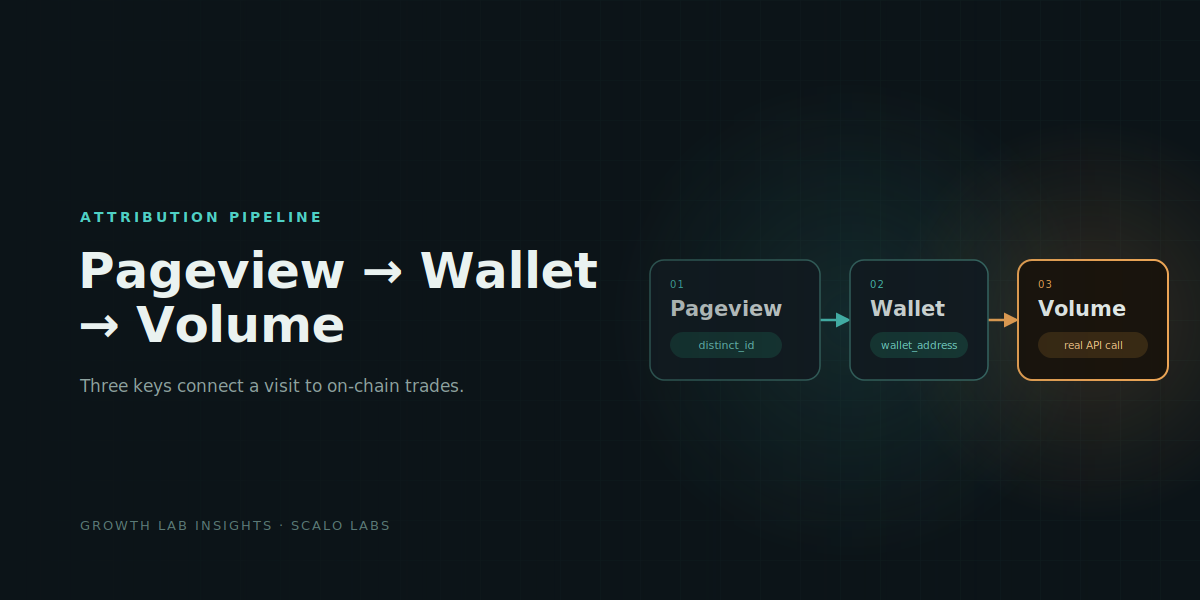
Most Web3 growth teams can report pageviews on a feature. Closing that gap between pageviews and wallet volumes doesn't require a warehouse. It requires getting three keys to join correctly: an anonymous visitor ID, a wallet address, and a date.
This post covers how we did it using PostHog's Destinations feature to push events out in real time, Apps Script as the receiving and processing layer, and a backend volume API we already had running elsewhere. The interesting part isn't any single tool. It's how the join chain holds the whole thing together.
The Business Question
A pageview count alone can't tell a growth team whether a channel is working. Two channels can produce identical traffic and wildly different outcomes once you look at what visitors actually did after landing.
There's a second reason wallet-level granularity matters, and it only shows up once you have it: aggregate volume numbers can hide extreme concentration. A small handful of wallets ended up responsible for the large majority of that week's total trading volume, with dozens of other new wallets contributing comparatively little. Reported as a single weekly total, that week looks like a broad campaign win. Broken out at the wallet level, it's really a story about a couple of individual traders. If acquisition budget gets allocated off the aggregate number, you're effectively optimizing for one person's behavior. Per-wallet, per-day granularity is what lets you catch that before it distorts a spend decision.
The Data Architecture
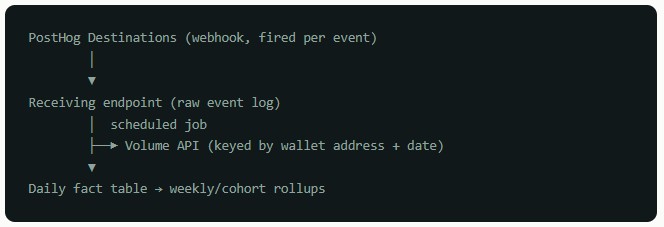
Two events matter here: a pageview on the target feature, and a wallet-linked event fired once a visitor connects a wallet. Both are pushed out of PostHog in real time using Destinations. This is the part worth walking through in detail, since it's the piece that makes everything downstream possible.
Setting Up a PostHog Destination
PostHog Destinations let you push data out of PostHog the moment a specific event fires, without polling or exporting anything manually.
To set one up for an event like a pageview or a wallet-connection action:
-
In PostHog, go to Data pipeline → Destinations → New destination, and choose the HTTP Webhook destination type.
-
Set the trigger to fire only on the specific event you care about, not "all events." Filtering at the source means your receiving endpoint doesn't have to do its own event-type filtering downstream.
-
Point the webhook URL at your receiving endpoint.
-
Configure the payload template. PostHog gives you access to the event name,
distinct_id, eventproperties, and any person properties already associated with that user. You decide exactly which fields get sent, rather than forwarding the entire raw event. -
Add a shared secret as a header or a payload field, and check for it on the receiving end before processing anything. PostHog's webhook payloads aren't signed by default, so this is your only validation that a request actually came from your PostHog project.
-
Use the Test steps panel before going live. It lets you fire a synthetic event through the destination and inspect the exact payload your endpoint will receive, without waiting for real traffic.
Set up two destinations this way, one per event you're tracking, each pointed at its own receiving function. Keeping them separate at the PostHog level, rather than one destination trying to route multiple event types, keeps the payload shape predictable on the receiving end.
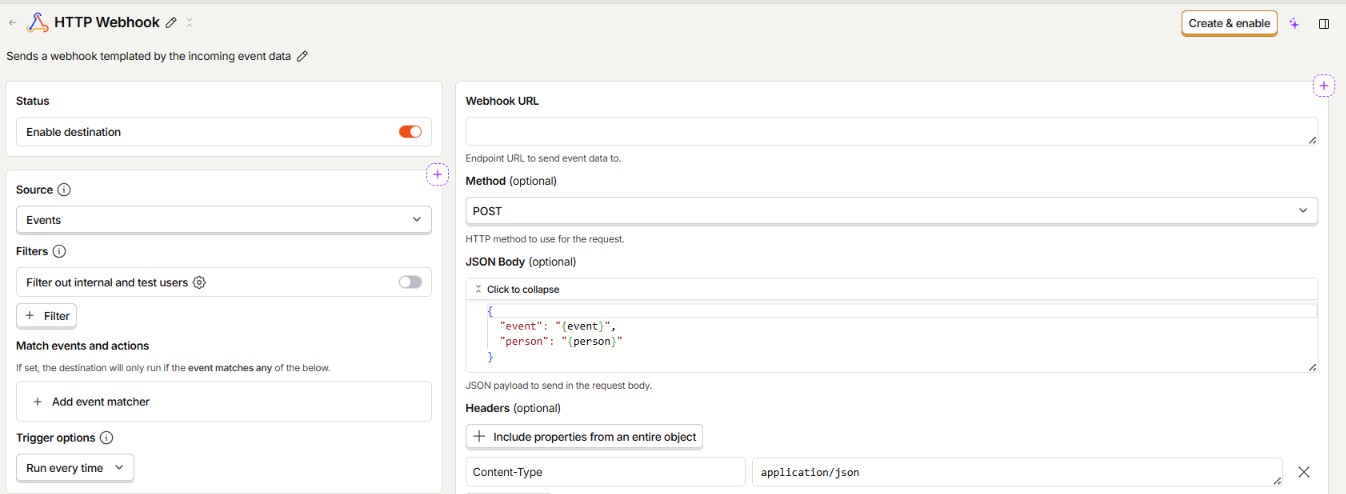
By hooking up PostHog's events to the webhook, we now have front-end data from the visitor's properties on the traffic source and country (geo) along with any custom properties such as wallet address. Once wallet address is available, on-chain volume can now be retrieved and then associated back to the user's properties.
Receiving the Event
The receiving side is a simple HTTP endpoint that validates the shared secret and appends a row:
function doPost(e) {
  const payload = JSON.parse(e.postData.contents);

  if (payload.secret !== SECRET) {
    return ContentService.createTextOutput('unauthorized');
  }

  const sheet = SpreadsheetApp
    .openById(SHEET_ID)
    .getSheetByName(PAGEVIEW_SHEET_NAME);

  sheet.appendRow([
    payload.timestamp,
    payload.distinct_id,
    payload.properties.wallet_address || '',
    payload.properties.referring_domain,
    payload.properties.utm_source || '',
    payload.properties.country_name,
    payload.properties.is_bot || false
  ]);

  return ContentService.createTextOutput('ok');
}
One early bug worth naming: two receiver functions living in the same project share global scope. Giving both a generic SHEET_NAME constant with different values caused a silent collision: one receiver's writes landed in the wrong tab. Fixed by giving each receiver its own uniquely named constant. The shared SECRET, by contrast, was safe to declare once, since that value was genuinely identical across both.
The Join Chain: How Pageviews Become Wallets Become Volume
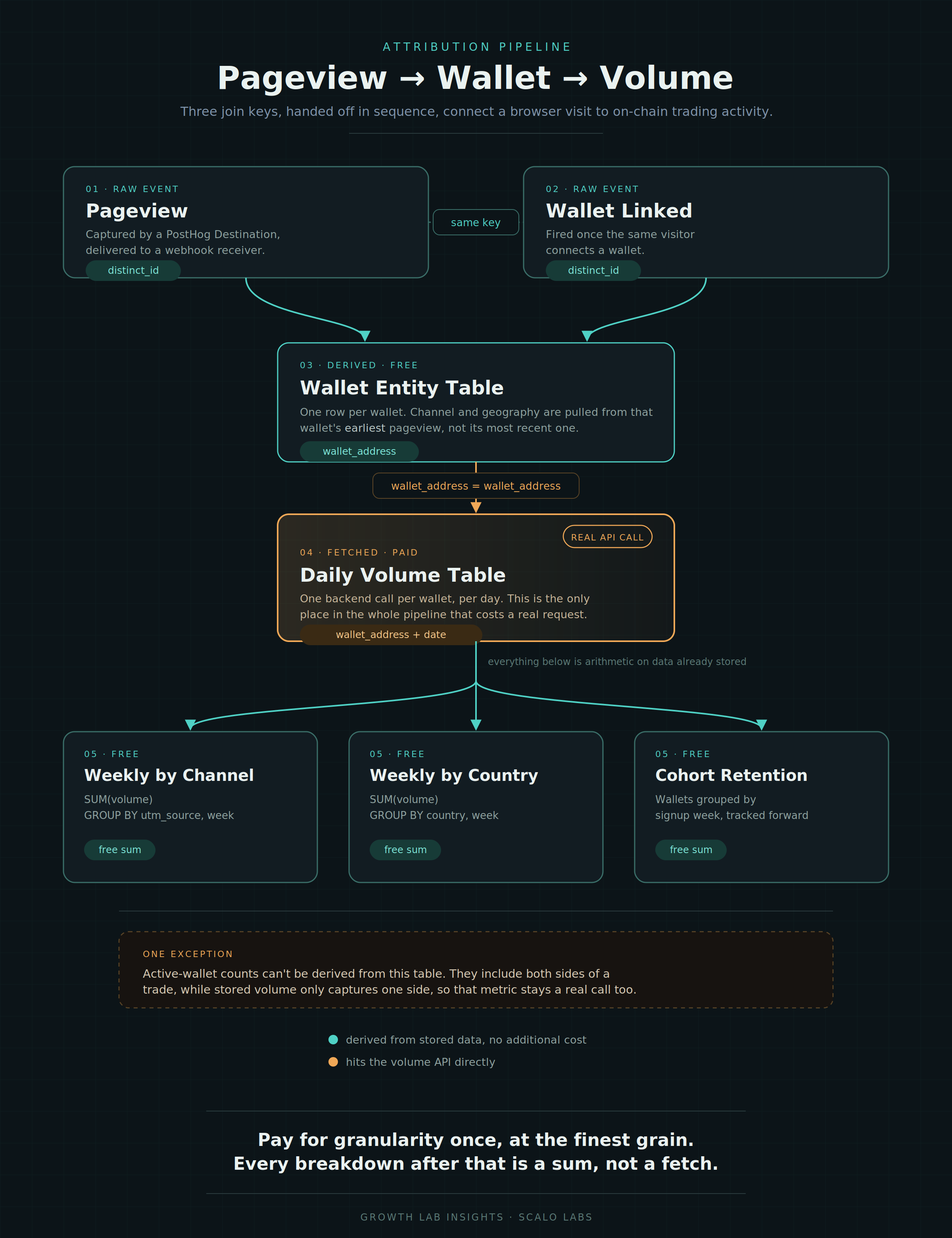
This is the part that actually makes the pipeline work, and it comes down to three keys handed off in sequence:
STEP 1 distinct_id links a pageview to a wallet connection.
PostHog assigns every anonymous visitor a distinct_id before they've done anything identifiable. When that same visitor later connects a wallet, the wallet-linked event carries the same distinct_id. PostHog either preserves it across the session or merges the identity if the user was later identified. That shared distinct_id is the join key between your raw pageview log and your raw wallet-linked log.
STEP 2 distinct_id resolves to a wallet_address, and attribution rides along.
Once you know which distinct_id values eventually linked a wallet, you build a deduplicated entity table: one row per wallet. For each wallet, you look up that same distinct_id's first pageview event and pull its channel and geography fields (UTM source, country) onto the wallet row. This is why first-touch attribution matters here: a visitor might return through multiple channels before ever connecting a wallet, and you want the channel that actually brought them in, not whichever one happened to be active on their last visit.
STEP 3 wallet_address is the only key the volume API understands.
The backend volume API has no concept of distinct_id. It only knows on-chain addresses. So the join key switches at this point: daily volume rows come back keyed by (wallet_address, date), and you join those back to the entity table on wallet_address to inherit the UTM/country attribution that was resolved in step 2.
Put together:
pageview_events.distinct_id
        = wallet_linked_events.distinct_id
                │
                ▼
wallet_entity_table.wallet_address (attribution carried from earliest pageview)
        = daily_volume_table.wallet_address
                │
                ▼
weekly rollups = SUM(daily_volume_table.volume)
                 GROUP BY wallet_entity_table.utm_source, week
Every weekly and cohort number in the pipeline is downstream of that chain. Get the distinct_id to wallet_address handoff wrong, say by using last-touch instead of first-touch, or by re-resolving attribution on every run instead of locking it at first sight, and every rollup built on top silently inherits the error. It's worth building and sanity-checking the entity table as its own isolated step before trusting anything summed from it.
Pulling Volume from the Backend API
Volume and fills come from a scheduled job calling an internal backend endpoint directly, not through the webhook path:
function fetchWithRetry(url, maxRetries) {
  for (let attempt = 1; attempt <= maxRetries; attempt++) {
    try {
      const response = UrlFetchApp.fetch(url, { muteHttpExceptions: true });
      if (response.getResponseCode() === 200) {
        return JSON.parse(response.getContentText());
      }
    } catch (err) {
      // Some hosted backends throw a network-level exception on a cold
      // start rather than returning a bad status code. A plain
      // response code check alone won't catch this failure mode.
      Utilities.sleep(1000 * attempt);
    }
  }
  throw new Error('Failed after ' + maxRetries + ' attempts: ' + url);
}

function getDailyWalletVolume(walletAddresses, dateStr) {
  const BATCH_SIZE = 25; // UrlFetchApp has a URL length ceiling
  const results = [];

  for (let i = 0; i < walletAddresses.length; i += BATCH_SIZE) {
    const batch = walletAddresses.slice(i, i + BATCH_SIZE);
    const url = API_BASE_URL + '/volume'
      + '?date=' + dateStr
      + '&addresses=' + batch.join(',');

    results.push(...fetchWithRetry(url, 3));
  }

  return results;
}
Two design decisions here matter more than the code itself:
Store at (day, wallet) grain, not batched by channel. An earlier version of this pipeline batched requests by UTM source and country and only fetched weekly totals, specifically to reduce call volume against the backend. That got reverted. The load ceiling being optimized around didn't actually exist in practice, and the batched version had a real cost: every new breakdown needed a fresh API call pattern. Storing volume per wallet per day means every later rollup, by channel, by country, by cohort, is a free sum over data already on hand, joined through the chain described above.
Why Did the Sheet Have Duplicate Rows?
Google Sheets will silently coerce an ISO date string into a real Date object on certain writes. That broke an exact-match key comparison inside the upsert logic: two values that looked identical on screen weren't === equal underneath, and it produced duplicate rows for the same date.
Fix: force every date column to plain text (setNumberFormat('@')) so it can never get silently reinterpreted.
That same upsert logic is worth calling out on its own: every output sheet updates an existing row by key rather than appending. Without that, re-running a job, or a backfill that overlaps live data, duplicates history instead of correcting it.