How to Build Your First Trading Bot on dreamDEX (Somnia) - Beginner Walkthrough
I recently built my first on-chain trading bot, a simple market maker, on dreamDEX, the on-chain order-book perpetuals exchange on the Somnia chain. If you've never built a trading bot before, this is the walkthrough I wish I'd had going in: real commands, real code, and the actual lessons that came out of it.
The whole thing runs on dreamDEX's open-source bot kit:
Repo: github.com/somnia-chain/dreamdex-bot-kit
It ships a shared client library, five runnable strategies (starter, market-making, grid, momentum, mean-reversion), and a docs folder.
Starting Point: The Trading Bot Builder Wizard
dreamDEX has a clean in-browser wizard at app.dreamdex.io/dreambot-builder: Register → Strategy → Network → Tune → Deploy. It walks you through picking a strategy (I went with Starter, the simplest two-sided quote bot), choosing testnet, toggling dry-run mode, and setting spread and order size.
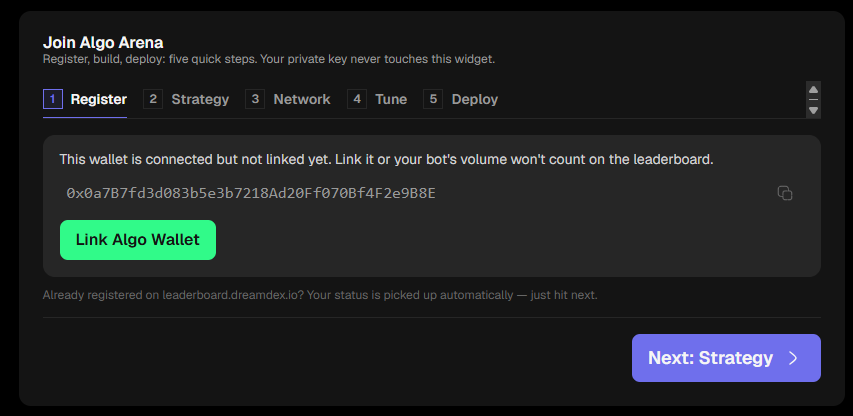
"Deploy" here means the wizard hands you a ready-made .env config and a git clone command, not a one-click hosted bot. The real work happens afterward, in a terminal.
Setting Up the Environment
git clone https://github.com/somnia-chain/dreamdex-bot-kit
cd dreamdex-bot-kit
npm install
If you're on Windows and don't already have them:
-
Git for Windows: git-scm.com/download/win
-
Node.js (LTS): nodejs.org
One common snag: installing either of these doesn't update an already open terminal window's PATH. Close and reopen your terminal before trying the command again. That alone resolves most "command not recognized" errors right after a fresh install.
Then set up config:
cp .env.example .env
The root .env holds your PRIVATE_KEY and NETWORK (keep this as testnet while learning). Each strategy also has its own .env.example with strategy-specific knobs. For Starter:
cd strategies/starter
cp .env.example .env
PRIVATE_KEY=0x...
NETWORK=testnet
DRY_RUN=true
SYMBOL=SOMI:USDso
STARTER_SPREAD_BPS=10
STARTER_SIZE_USDSO=20
STARTER_TICK_MS=5000
Understanding the Two Wallets
dreamDEX's website front-end uses an embedded-wallet pattern for onboarding: you connect a regular wallet (MetaMask) to log in, and the site generates a separate smart wallet under the hood that it actually trades from in the browser UI.
That's a nice design for onboarding non-crypto-native users. But your bot, running from dreamdex-bot-kit, signs directly with the raw PRIVATE_KEY in your .env, a completely different address from whatever the website shows as "connected." Any funding needs to go to the exact address your bot's key controls, not the address shown on the trading site.
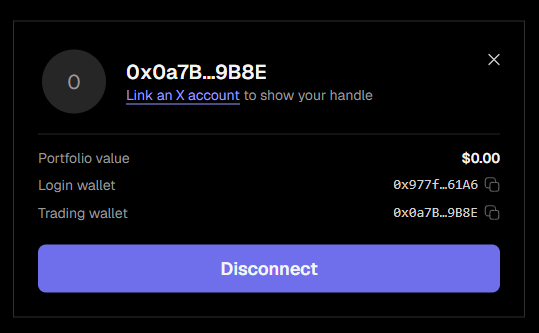
Check which address your bot is actually using. The kit includes a read-only diagnostic script for exactly this:
npx tsx scripts/doctor.ts
This prints your wallet address, network, gas balance, and your token balances across every market. No risk, no transactions sent.
Getting Testnet Funds
Testnet tokens are free but rate-limited, so it's worth having more than one source lined up:
-
Google Cloud Web3 Faucet (Somnia Shannon): cloud.google.com/application/web3/faucet/somnia/shannon. Paste your address to get 1 STT. Limited to one claim per wallet per day.
-
Faucet Trade: faucet.trade/somnia-shannon-stt-faucet, an independent third-party faucet with its own separate rate limit.
To check your balance any time, use the same doctor.ts script, or view it directly on the block explorer: Somnia Shannon Explorer at shannon-explorer.somnia.network.
Making a Manual Trade (Without the Website)
Since your bot's wallet is separate from whatever wallet the website trades from, the cleanest way to fund one side of a market is to trade directly from the bot's own wallet using the kit's built-in script, rather than through the website UI.
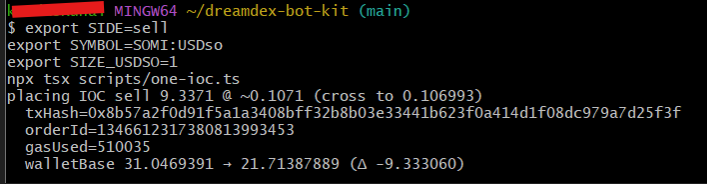
The repo includes scripts/one-ioc.ts, a small script that places a single "immediate-or-cancel" order signed directly by your bot's private key:
export SIDE=sell
export SYMBOL=SOMI:USDso
export SIZE_USDSO=2
npx tsx scripts/one-ioc.ts
Here's the relevant logic from the script:
const ctx = createChainContext();
const pool = await Pool.load(ctx, process.env.SYMBOL ?? "USDC.e:USDso");
const side = (process.env.SIDE ?? "buy") as "buy" | "sell";
const sizeUsdso = Number(process.env.SIZE_USDSO ?? "1.5");
const { bestBid, bestAsk } = await pool.topOfBook();

const isBid = side === "buy";
const touch = isBid ? bestAsk : bestBid;
const price = isBid ? touch * 1.001 : touch * 0.999; // cross by 10 bps
const qty = sizeUsdso / touch;

const res = await pool.place({ isBid, price, qty, orderType: ORDER_TYPE.ImmediateOrCancel });
What this is actually doing: it reads the current best bid/ask, then prices your order slightly through the opposite side of the book (0.1% past the touch) so it crosses immediately instead of resting and waiting for a counterparty. That's the difference between a "market-ish" order and a resting limit order. An IOC order that doesn't cross anything simply cancels with no fill.
Output looked like this:
placing IOC sell 18.2482 @ ~0.1096 (cross to 0.109490)
  txHash=0x...
  orderId=...
  gasUsed=521869
  walletBase 49.218060878 → 30.974929664 (Δ -18.243131)
The balance delta at the end is the easiest way to confirm the trade actually happened. It's reading your wallet's on-chain balance before and after the call, not just trusting that the transaction didn't throw an error.
Reading On-Chain Errors Like a Detective
Decoded custom errors are great. An order once failed with a clearly named error:
[QTY_BELOW_MIN] quantity 450000000000000000 is below the market minimum 1000000000000000000.
That's a named error the ABI recognized. The tooling (I used viem) decoded it automatically, telling me exactly what to fix.
Raw reverts take more digging. Sometimes you'll just get execution reverted with no further detail.
Looking at the core placeOrder execution logic explained why: the contract has a specific funding path depending on whether the input token is native or an ERC-20:
let value = 0n;
if (inputToken.toLowerCase() === NATIVE_SENTINEL.toLowerCase()) {
  value = requiredAmount; // native input rides in msg.value
} else {
  await ensureAllowance(ctx, inputToken, p.pool, requiredAmount);
}
When a raw revert like this comes up, the move is to check the fundamentals directly: wallet balance, token allowance, order size versus minimums, rather than guessing from the error text.
Watch for scripts that quietly truncate their own errors. One diagnostic script capped its printed error at 300 characters:
main().catch((e) => { console.error(String(e).slice(0, 300)); process.exit(1); });
Removing the .slice(0, 300) (a one-line edit) revealed the full error, which had been getting cut off right before the useful part every single time.
A Classic JavaScript Timing Lesson (and How to Fix It)
The Starter strategy's main loop looks like this:
const interval = setInterval(() => {
  tick().catch((e) => log("tick error", (e as Error).message));
}, config.tickMs);
await tick(); // quote immediately
setInterval fires on a fixed clock, regardless of whether the previous tick() call has actually finished. Each tick() does several sequential blockchain calls: cancel old orders, place a new buy, wait for confirmation, place a new sell, wait for confirmation. This can easily take longer than a short interval. When that happens, a second cycle starts before the first has wrapped up, and both end up racing over the same wallet's transaction nonce, causing a "nonce too low" collision.
The fix: lengthen STARTER_TICK_MS in your .env so each cycle has time to fully complete before the next one starts:
STARTER_TICK_MS=20000
Bumping it from the default 5 seconds to 20 seconds gave each cycle enough headroom on testnet, and the nonce collisions stopped entirely. You can tune this back down once you've observed how long a full cycle actually takes on your network.
Takeaway: if you ever see a "nonce too low" error in a bot running on a timer, check for overlapping async cycles before assuming it's network flakiness.
Not Every Error Is Actually a Problem
Late in testing, a cancel call failed:
cancel failed The contract function "cancelOrder" reverted...
Checking balances directly (via doctor.ts again) told a better story: SOMI balance had gone up and USDso had gone down by almost exactly the order's size.
The order hadn't failed to cancel because of a bug. It had already been filled by a real counterparty in the few seconds before the cancel landed. You can't cancel an order that's already executed, and that's a sign the bot's core job, getting real quotes filled, was working.
Resources Used
-
Bot kit repo: github.com/somnia-chain/dreamdex-bot-kit
-
dreamDEX app: app.dreamdex.io
-
Git for Windows: git-scm.com/download/win
-
Node.js: nodejs.org
-
Google Cloud Web3 Faucet (Somnia Shannon): cloud.google.com/application/web3/faucet/somnia/shannon
-
Faucet Trade: faucet.trade/somnia-shannon-stt-faucet
-
Somnia Shannon Explorer: shannon-explorer.somnia.network
-
viem docs: viem.sh
Wrapping Up
By the end of this, I had a real market-making bot running live on dreamDEX's testnet: placing genuine two-sided quotes, getting real fills, and handling ordinary live-trading edge cases gracefully. None of the individual lessons above are unique to this platform. They're the standard learning curve of building your first on-chain bot anywhere. If you're a first-timer working through something similar right now: this is completely normal, and every one of these is a solvable, well-documented pattern once you know what to look for.