GA4 BigQuery Identity Stitching: The Definitive Guide to Unlocking Real Web3 User Counting

What is Identity Stitching in Web3 Analytics?
Identity stitching is the process of merging a user's anonymous 'Guest' activity (Client ID) with their 'Authenticated' activity (Wallet Address) to create a single, unified user profile. In Web3, this prevents over-counting users who visit your site before connecting their wallet. A single person might browse your dApp on a laptop (Pseudo ID A), switch to a mobile phone (Pseudo ID B), and finally connect their crypto wallet (hashed_wallet_id).
Without Identity Stitching, your analytics will report two separate users. With it, you see the truth: one human, multiple touchpoints.
You can check out an earlier post on how to hash wallet ids before sending data to GA4/BigQuery using n8n + GTM. https://scalolabs.com/blog/web3-analytics/track-web3-wallet-balance-ga4-bigquery-n8n
The pre-requisite for user tracking is to at least have a DataLayer event with a 'wallet_connect' event that becomes the trigger. Example: On this test website https://scalo-testing.vercel.app/
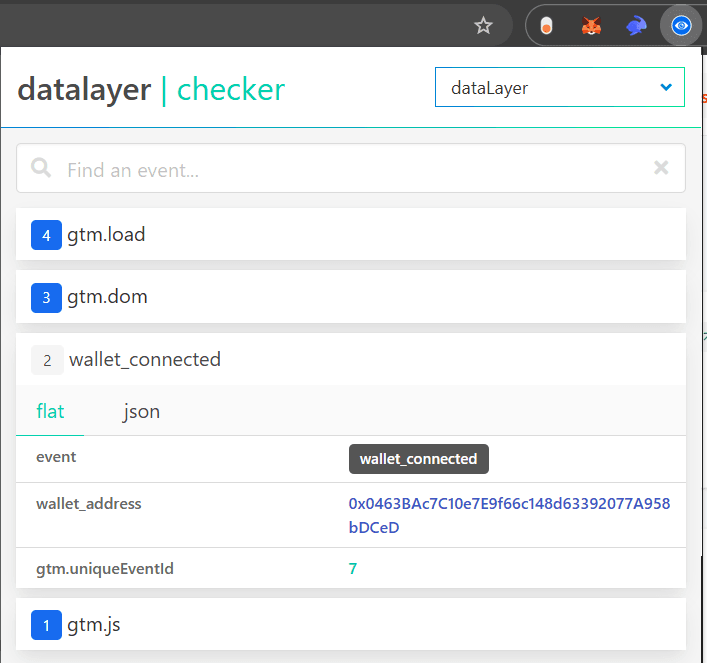
There are two aspects to this:
-
If you have enabled user_id in GTM/GA4, it becomes easier.
-
IF, for some reason, you didn't enable user_id tracking in GA4, how do query past data in BigQuery to get unique user counts using: hashed_wallet_id as the primary source and if not, then pseudo_client_id as the fall back method.
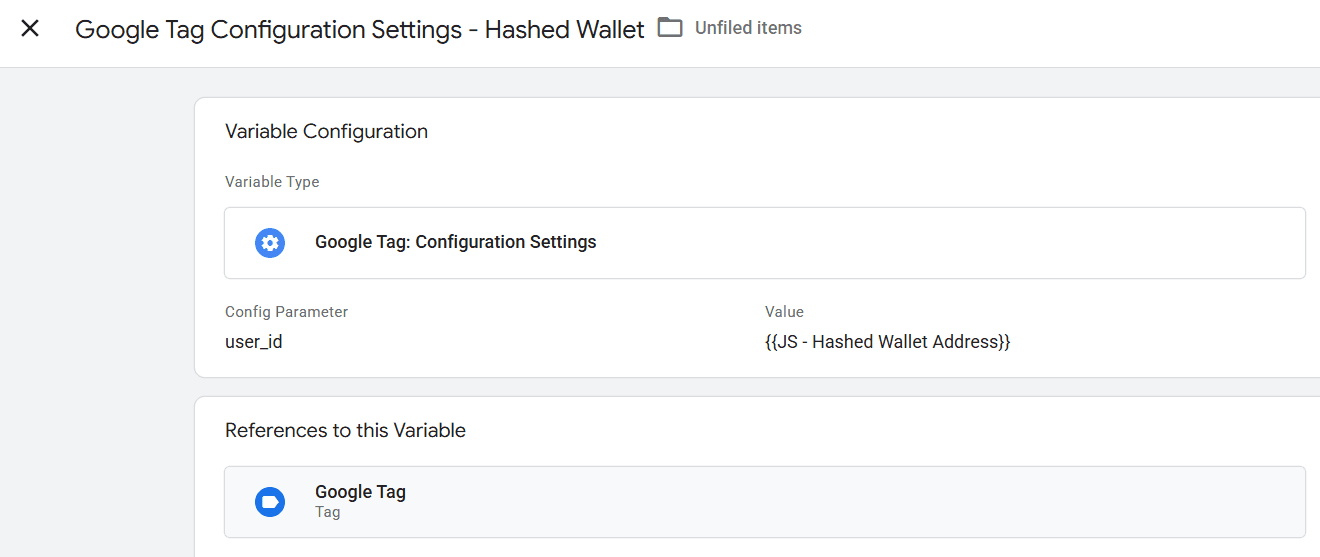
Inside GTM, start by opening the Google Tag > Configuration Settings Variable and adding the user_id along with the hashed wallet id
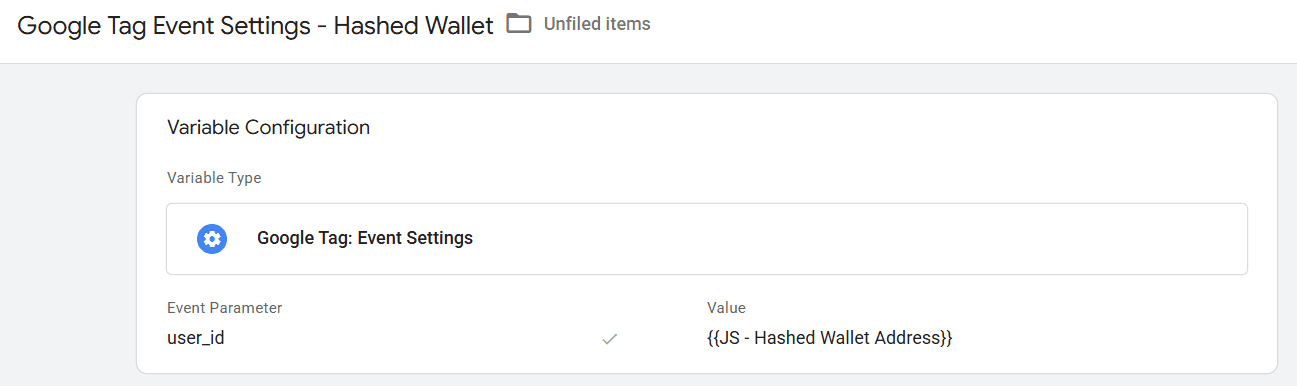
As a backup, also add the values as event parameters to sent to GA4 in all events.
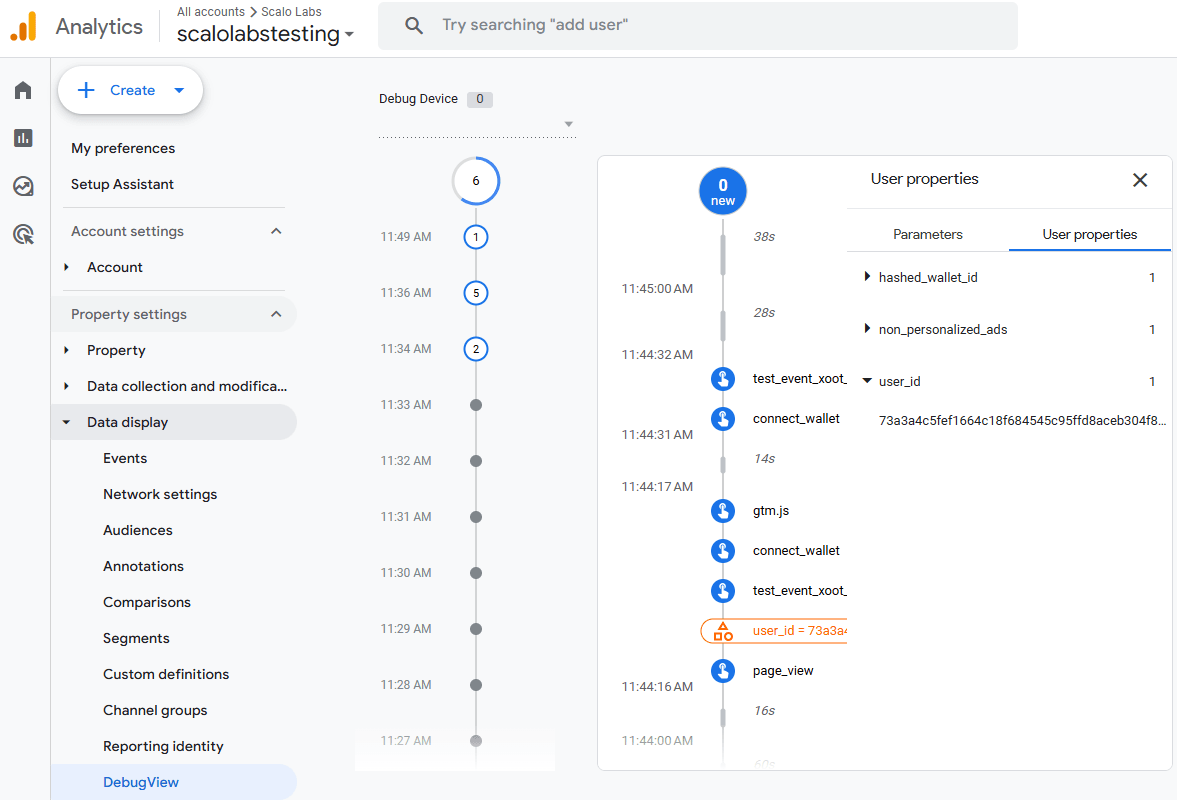
When you preview the GTM setup in GA4 Admin > Data Display > Debug View, you should see the user_id pop up once it becomes available.
The second scenario is that you DID NOT implement user_id tracking in GA4 but also want to query data around unique users who visited the site by just browsing or by connecting wallet.
Again, this presumes that hashed_wallet_id is already being sent to GA4/BigQuery as a user property explained via this setup: https://scalolabs.com/blog/web3-analytics/track-web3-wallet-balance-ga4-bigquery-n8n
To merge Web3 wallet IDs and anonymous client IDs in GA4 BigQuery for an accurate unique user count, follow these three steps:
Extract the Hashed Wallet ID: Use an UNNEST function to isolate the hashed_wallet_id value from the user_properties array for every event row.
Backfill and Resolve Identity: Apply a window function MAX() OVER(PARTITION BY user_pseudo_id) to look across the user's entire history. If a wallet connection is found, this formula "backfills" it to all of that user's anonymous (guest) events.
Prioritize and Deduplicate: Create a final_identifier using the COALESCE function. This final identity prioritizes the resolved Wallet ID, falling back to the user_pseudo_id only if no wallet connection ever occurred.
Step 1: The Logic of User Resolution
To get a "True Unique User" count, we follow a specific hierarchy of identity: Primary ID: The hashed_wallet_id (if the user connected their wallet at any point). Secondary ID: The user_pseudo_id (if the user remained a guest). By using this logic, we ensure that if a user ever connects a wallet, their previous "anonymous" sessions are merged into that wallet identity rather than counted as a separate guest.
Step 2: Building the "Stitched" SQL Query
In BigQuery, GA4 data is exported as raw events. Because hashed_wallet_id is a nested user property, we must unnest it and use window functions to look across the user's entire history
How to Count Unique Users in BigQuery? To count unique users accurately, you must prioritize the hashed_wallet_id and fall back to the user_pseudo_id. Use the MAX() OVER(PARTITION BY...) window function to "stitch" anonymous events to the wallet address once it is discovered.
SELECT
  actual_identity,
  COUNT(DISTINCT unique_session_id) AS total_sessions
FROM (
  SELECT
    user_pseudo_id,
    CONCAT(user_pseudo_id, CAST((SELECT value.int_value FROM UNNEST(event_params) WHERE key = 'ga_session_id') AS STRING)) AS unique_session_id,
    MAX((SELECT value.string_value FROM UNNEST(user_properties) WHERE key = 'hashed_wallet_id')) OVER(PARTITION BY user_pseudo_id) as resolved_wallet,
    COALESCE(
      MAX((SELECT value.string_value FROM UNNEST(user_properties) WHERE key = 'hashed_wallet_id')) OVER(PARTITION BY user_pseudo_id),
      user_pseudo_id
    ) as actual_identity
  FROM
    `scalo-labs-testing.analytics_522138408.events_*`
  WHERE
    _TABLE_SUFFIX BETWEEN '20260316' AND '20260317'
)
GROUP BY 1
Why use ga_session_id for Session Counts? The ga_session_id is a Unix timestamp of when a session begins. GA4 documentation: Session ID is automatically generated as the timestamp in seconds when a session starts. To analyze different sessions outside of Google Analytics, consider joining the user_id or user_pseudo_id with the session_id to get a unique identifier for each session. https://support.google.com/analytics/answer/9191807?hl=en
Common FAQ for GA4 BigQuery Exports
Why is my user count different in BigQuery? BigQuery uses raw events, while the GA4 UI uses modeled data and "Reporting Identity" thresholds.
What is a User-Scoped Dimension? It is a property that, once set, stays attached to a user's future events, making identity resolution possible.
Why count Sessions this way? You might notice we don't just count the session_start event. In BigQuery, the ga_session_id is simply a Unix timestamp of when the session began. Because it is not globally unique, we concatenate it with the user_pseudo_id to ensure our session count is 100% accurate across different users and devices.